SEE INSIDE YOUR APP
Observability for Flutter — Logs + Session Replay

Two tools, one SDK: structured Logs from your app in production and Session Replay with screenshots and taps of every user's real journey.

Install the package from pub.dev, paste your project token, and the data starts arriving in your dashboard on its own. No agents, no strange setup.

Sign up with Google in 10 seconds · no credit card · explore a real example project without signing up →
The FlogFlow mascot: a frog that catches bugs
logs · my-app · prod · last 24 h
14:02:11infosession started · {userId: u_123}
14:02:14debugGET /api/catalog → 200 (182 ms)
14:02:31warntoken about to expire · logname: auth
14:02:47errorpayment declined · {orderId: o_9} · stack 📷
14:02:48infopayment retry scheduled
14:03:02emergencycrash: Null check operator used on a null value
pub.dev · flog_flow ^0.5.0
AES-256-GCM encrypted
installed in 5 minutes
SaaS or self-hosted
01 / Logs — what you'll use every day

Production logs,
sorted and searchable

Continuous, lightweight telemetry so you know how your app is doing. You emit logs from your code and query them in the dashboard: filters, search, stack traces, and volume per hour.

// 1 · initialize once, in your main()
await FlogLogs.init(
  projectToken: 'flw_xxxxxxxx',
  service: 'my-app', env: 'prod', version: '1.4.2',
);

// 2 · log wherever you need to
FlogLogs.info('session started', logname: 'auth',
    attributes: {'userId': 'u_123'});

FlogLogs.error('payment declined', logname: 'payments',
    error: e, stackTrace: st,
    screenshot: true,          // 📷 optional
    attributes: {'orderId': 'o_9'});

5 levels

emergency · error · warn · info · debug. Every error carries a stack trace; crashes emit emergency automatically.

Screenshot per log

Attach a capture of the screen at the moment of the error with screenshot: true.

Attributes and search

Per-log and global attributes (e.g. userId after login). In the dashboard: filters by level, logname, and text.

Offline-safe

Batches every 10 s, flush when going to background, and retry on the next launch if there was no network.

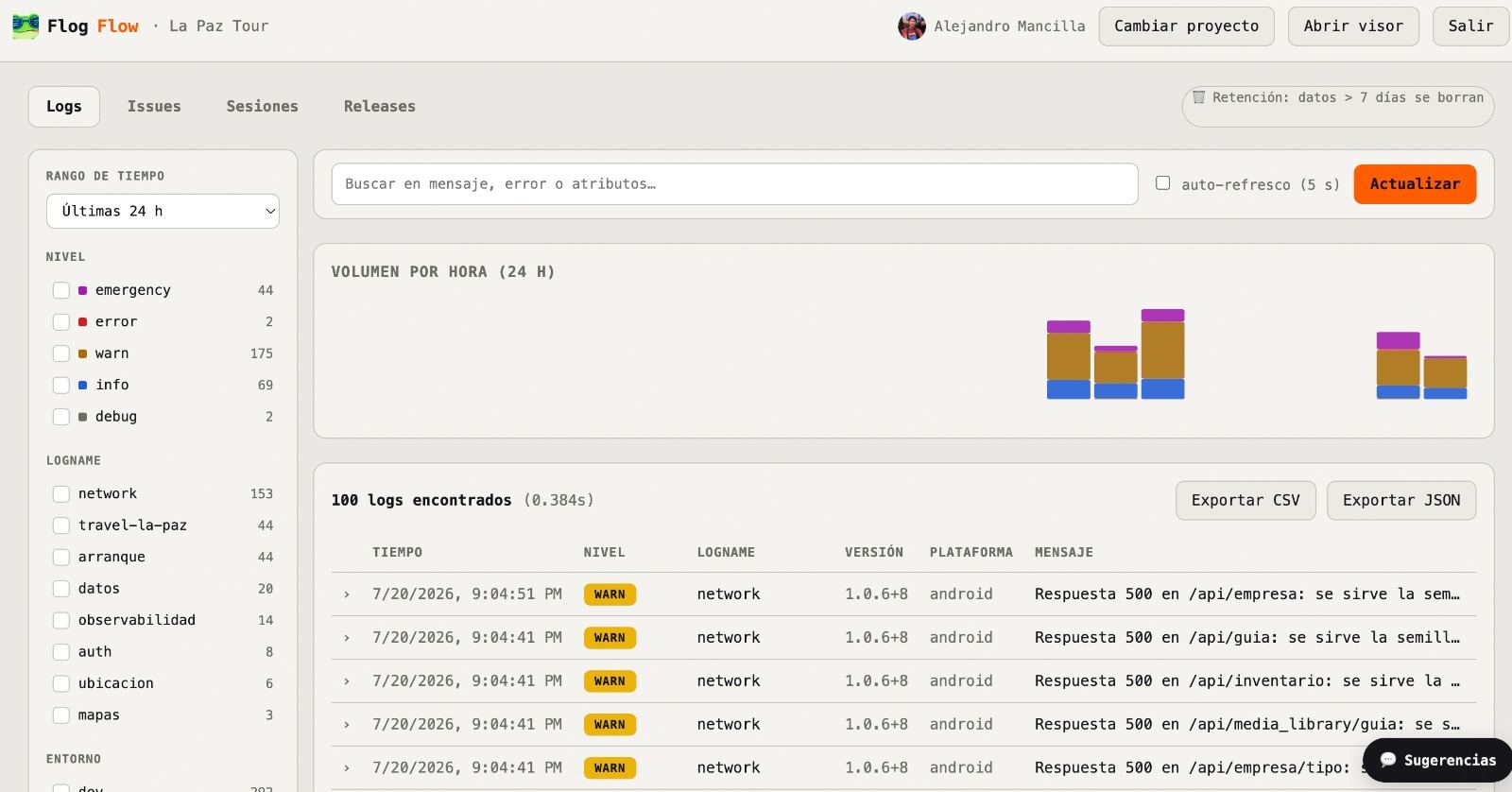
Logs dashboard: facets by level and logname, search, volume per hour and export
Your real dashboard: filters by level and logname, search, volume per hour, and CSV/JSON export.
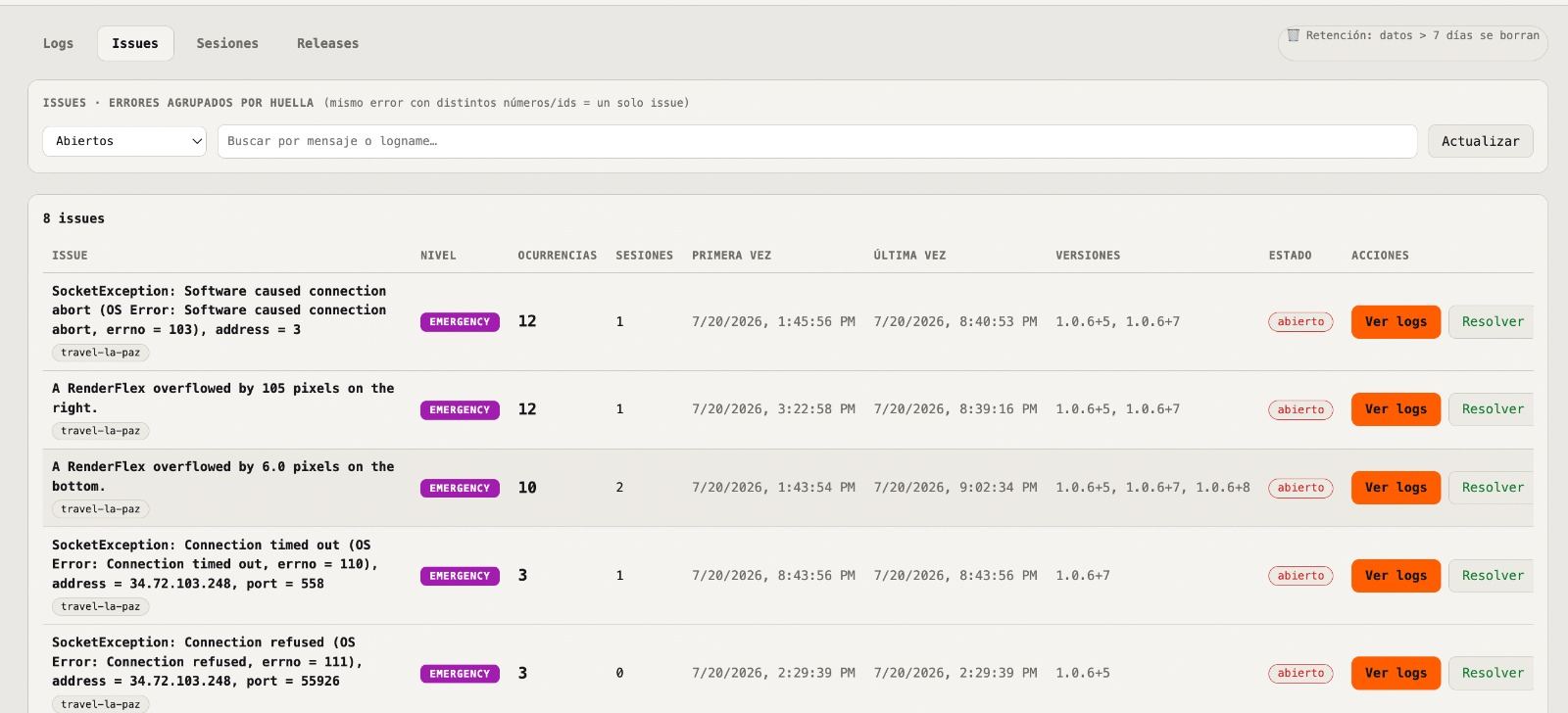
Issues: errors grouped by fingerprint with occurrences, sessions and status
Issues: the same error with different ids is grouped into one, with occurrences and status.
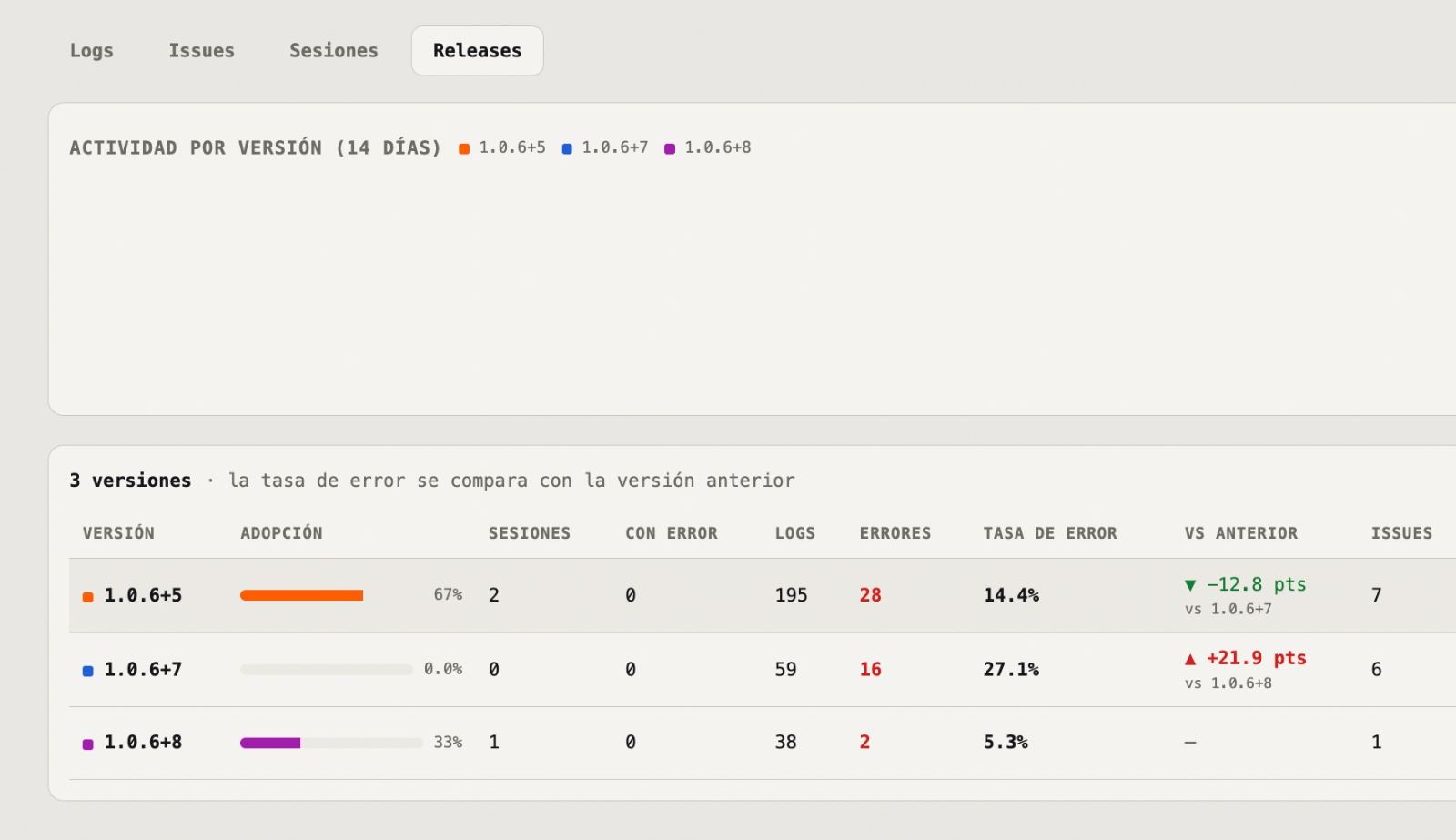
Releases: adoption, error rate and comparison between app versions
Releases: adoption and error rate per version, compared with the previous one.
02 / Session Replay — when you need to see what happened

The user's journey,
with screenshots and taps

Record screens, numbered taps, scrolls, navigation, and errors, and play it back step by step in the web viewer. Ideal for reproducing that bug that "only happens to one user" and for understanding real UX.

Home tap “Buy” Cart checkout ! Payment · error

Step-by-step replay

Wireflow of the journey + playback with a timeline: navigation, taps, network, logs, and errors in order.

Errors with context

Message, stack trace, and a screenshot of the instant it failed — plus everything the user did before.

Automatic upload

On going to background, on close, or on a crash. It only uploads if there's new content.

Privacy first

Everything travels encrypted (AES-256). Sensitive areas are masked with RedactedZone before capturing.

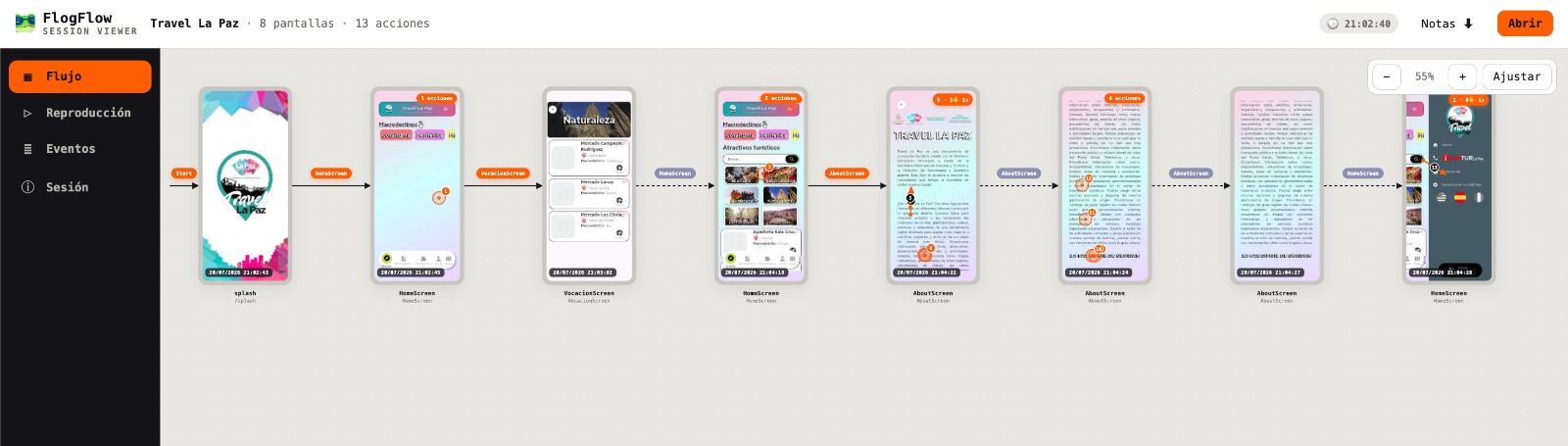
Session viewer: map of the real journey with screens, numbered taps and navigation
A real session in the viewer: each screen with its numbered taps and the navigation between them.
Both at once? They share the same token: Logs always on to measure, Replay when you need the full movie (even only when there was an error, with recordOnErrorOnly).
03 / Getting started

From zero to data
in 3 steps

1

Install the package

flutter pub add flog_flow

Published on pub.dev. Android, iOS, macOS, Windows, and Linux.

2

Create your account and project

Sign in with Google, create your project, and copy its flw_… token. Free, no credit card.

3

Paste the token in your main()

One call (FlogLogs.init or FlogCloud.start) and the data arrives in the dashboard on its own.

See the full guide → With copy-paste-ready snippets, including the free local mode with no account.
04 / Pricing

Start free

Free
$0
200 MB · forever
  • Logs + Session Replay in the cloud
  • Dashboard, statistics, and search
  • One-click playback
  • 200 MB shared across your projects
Start with Google
Most popular
$4.99 /month
1 GB of storage
  • Everything in the free plan
  • 1 GB shared across all your projects
  • Secure card payment (Polar)
  • Cancel anytime
Upgrade
Enterprise
Let's talk
tailored to you
  • More capacity and custom retention
  • Optional self-hosting
  • Zero-knowledge mode
  • SLA and dedicated support
Contact us
05 / FAQ

Frequently asked questions

Does it affect my app's performance?
Logs are batched JSON (minimal impact). In Replay, captures are deferred, low-resolution, and taken outside animations; everything expensive is opt-in. Your users don't notice it.
What happens to my users' sensitive data?
Sessions travel and are stored end-to-end encrypted (AES-256-GCM). Mark sensitive areas with RedactedZone and they're masked before capturing. Network capture stores neither headers nor bodies by default.
Do I have to use Logs and Replay together?
No. They're independent and use the same token. The usual setup: Logs always on in production, and Replay switched on when you need to investigate (or only when there's an error, with recordOnErrorOnly).
Can I try it without creating an account?
Yes. Local mode is free and needs no account: you record, export an encrypted .flowx file, and open it in the web viewer. There's also a demo session ready to look at.
Does it work on Flutter web?
The recorder runs on Android, iOS, macOS, Windows, and Linux (it uses dart:io). Flutter web isn't a recording target; the viewer and the dashboard are web, though.
Can I host it on my own infrastructure?
Yes. The platform is a self-contained Node server (SQLite, no native dependencies) that you can deploy wherever you like; the SDK accepts your own endpoint.